




























































































































saltar al contenido
es
CAD

Bienvenido al nuevo sitio web de Joto Imaging Supplies

Sawgrass Accessories

Filtrar

4 productos

  • Ordenar por

Frequently Asked Questions:

What are Sawgrass accessories and how do they enhance the sublimation printing process?

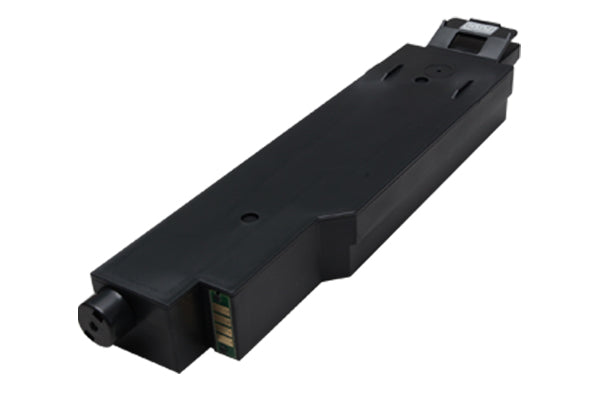
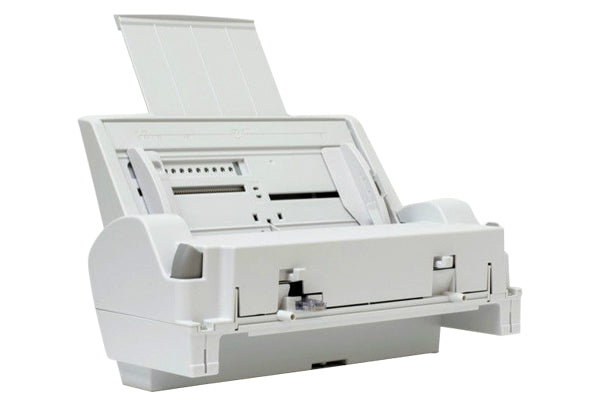
Sawgrass accessories encompass a range of specialized tools, including waste ink tanks, bypass trays, and replacement rollers, designed to maintain the peak performance of Virtuoso sublimation printers. These components enhance the printing process by ensuring precise media handling and optimal ink management, which prevents mechanical downtime and maintains high-resolution output. By using genuine Sawgrass parts, businesses can ensure long-term equipment reliability and consistent color accuracy across diverse sublimation substrates. Maintaining these accessories is essential for streamlining production workflows and achieving professional-grade results in custom product personalization.

Which Sawgrass printer models and ink systems are compatible with these Sawgrass Accessories?

Sawgrass accessories, such as the bypass tray and waste ink tanks, are primarily compatible with the professional-grade SG500 and SG1000 sublimation printer models. These accessories also maintain backward compatibility with the legacy Virtuoso SG400 and SG800 systems, allowing businesses to leverage existing hardware for expanded media capabilities. To ensure optimal performance, these components are designed to work seamlessly with genuine SubliJet UHD, Chromablast UHD, and Siser EasySubli ink systems. This integrated ecosystem provides technical reliability and consistent color accuracy for high-volume custom decoration workflows.

How can I ensure the long-term durability and proper maintenance of products decorated using Sawgrass Accessories?

Something went wrong. Try again.

How do you properly install and use Sawgrass Accessories to optimize your sublimation printing workflow?

To optimize your Sawgrass sublimation workflow, start by installing hardware enhancements like the bypass tray to accommodate expanded media sizes for your SG500 or SG1000 printer. Utilize essential accessories such as heat-resistant tape to ensure precise transfer alignment and heat-protective gloves for safe handling during the thermal pressing phase. By integrating the Sawgrass Print Utility software with high-quality SubliJet-UHD inks and premium sublimation paper, you can achieve superior color accuracy and consistent, professional-grade output.

What are the most common causes of poor color transfer or paper jamming when using Sawgrass Accessories for sublimation?

Common causes of poor color transfer when using Sawgrass accessories often include utilizing non-genuine sublimation inks or incorrect color profiles within the Sawgrass Print Utility. Paper jamming and misfeeds typically result from using low-quality transfer media that produces excess dust, improper loading in the paper tray, or a dirty feed belt and sensors. To ensure optimal performance, technical experts recommend maintaining a clean capping station and verifying that the heat press settings for time, temperature, and pressure are precisely calibrated for your specific sublimation blank. Consistent use of professional-grade accessories and routine maintenance cycles are essential for preventing output issues and achieving vibrant, high-resolution results.

How can I achieve maximum color vibrancy and professional print quality with Sawgrass Accessories?

To achieve maximum color vibrancy and professional results with Sawgrass Accessories, always utilize the Sawgrass Print Utility to select the specific ICC color profile for your substrate, such as wood, ceramic, or polyester. Ensure your heat press is fully calibrated and maintain a consistent temperature of 400°F to properly gas out the sublimation ink into the polymer coating. Using genuine Sawgrass TruePix sublimation paper and protective cover sheets prevents ghosting and moisture-related issues, preserving the rich color saturation and sharp details of your designs. Regular maintenance, including nozzle checks and keeping the printer powered on for auto-cleaning cycles, ensures optimal printhead performance for high-definition output.

How can using Sawgrass Accessories help my business reduce production costs and increase profit margins?

Integrating Sawgrass accessories, such as bypass trays and high-capacity ink systems, allows your business to scale production by supporting larger media sizes up to 51 inches and reducing the frequency of cartridge replacements. These purpose-built components optimize ink consumption and minimize downtime through seamless compatibility with the Virtuoso SG500 and SG1000 systems, leading to a significantly lower cost per image. By enhancing the versatility of your sublimation workflow, you can expand into higher-margin products like large-format signs and apparel without investing in entirely new machinery. This strategic upgrade improves overall labor efficiency and ensures professional-grade output, directly increasing your bottom line through increased throughput and reduced material waste.

How should Sawgrass Accessories be stored and handled to ensure optimal performance and user safety?

To ensure optimal performance and user safety, Sawgrass accessories and consumables should be stored in a cool, dry environment with temperatures maintained between 15°C and 30°C (59°F–86°F). Keeping items like bypass trays and ink collectors in their original packaging, away from direct sunlight and high humidity, prevents environmental degradation and maintains mechanical reliability. Proper handling involves keeping ink-related components upright and sealed to avoid contamination or premature drying, ensuring the longevity of your Virtuoso printer system. Following these technical guidelines and a first-in, first-out inventory system will maximize the efficiency of your sublimation workflow and guarantee professional-grade print results.

How do Sawgrass Accessories compare to other decoration methods for creating high-quality personalized products?

Sawgrass accessories and integrated systems offer a superior alternative to traditional decoration methods by providing a fully optimized, turnkey solution for high-resolution sublimation on both hard and soft substrates. Unlike generic transfer processes, Sawgrass components are precision-engineered to work with SubliJet-UHD and VersiFlex inks, ensuring exceptional color fidelity, durability, and a "printed-on" finish that becomes part of the substrate. By utilizing specialized bypass trays and high-quality TruePix paper, users can achieve professional-grade results with lower setup costs and less labor than screen printing or vinyl weeding. This technical ecosystem from Joto Imaging Supplies streamlines production efficiency, allowing for rapid, small-batch customization without compromising the industrial-level quality required for retail-ready products.

How can you calibrate color profiles and adjust ink saturation levels in Sawgrass Print Manager to ensure color consistency across specialized Sawgrass Accessories and substrates?

To ensure color consistency across specialized Sawgrass accessories, navigate to the Color Management tab in the Sawgrass Print Utility and select the Custom color mode to access advanced calibration sliders. You can fine-tune ink saturation and brightness to prevent color bleeding or muted results, ensuring the output matches the specific thermal requirements of your substrate. Once you achieve the desired profile, save these parameters as a custom configuration to streamline production and maintain professional brand standards across different media types. This technical adjustment is vital for managing high-pigment density while preserving sharp image fidelity on various sublimation blanks.

Drawer Title
productos similares